Firefox 156.0.1LibreWolf hardeningTor built inWindows

The fastest, most protected browser I know how to build.

Adrian Browser runs on the Firefox engine. Everything that phones home is gone, the interface fits in a single row, memory is handed back while you are not looking, and every private window travels through Tor.

Download for Windows

v0.1.0 · 88.7 MB · Windows 10/11 x64 · Sep 21, 2026

See how it was built
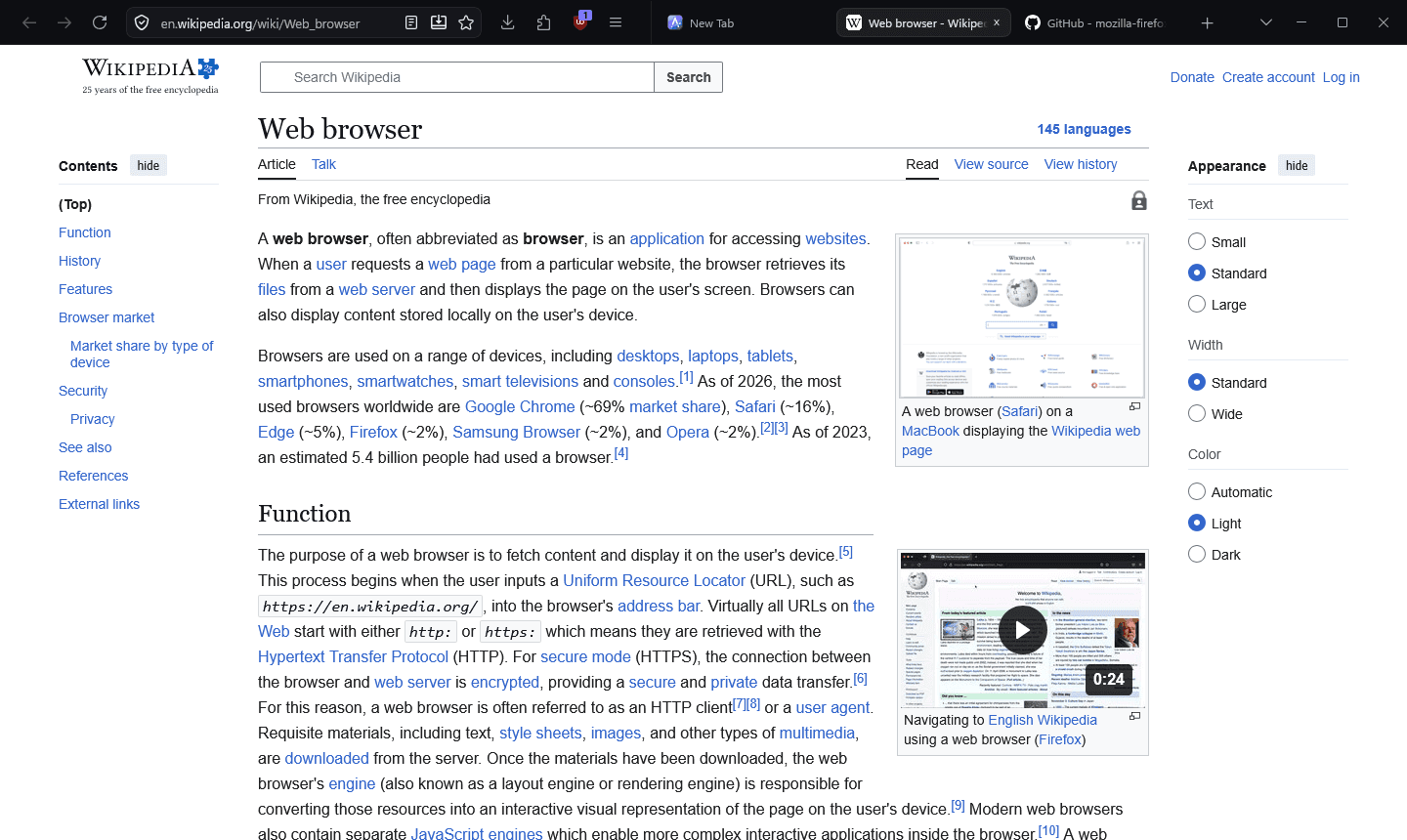
Adrian Browser showing a web page, with navigation, address bar, tabs and window controls in a single dark row
Navigation, address bar, tabs and window controls share one row.
−31%
memory with six tabs open
0
DNS or IP leaks in private windows
1 row
navigation and tabs together
0
telemetry sent anywhere

01 · Origin

Built on Firefox, after a false start on Chromium.

A browser you cannot rebuild in minutes is a browser you stop improving.

Adrian Browser is a Firefox browser: it runs Gecko, the Firefox engine. The very first attempt used Chromium 153, but a single build was estimated at six to eight hours on a Ryzen 5 5500, so that tree was deleted before anything shipped.

The project restarted on the Firefox release branch, with the LibreWolf hardening layer on top and my own layer above that. Nothing is edited inside the Firefox source: settings, theme, privacy and performance live in their own folders, and ten small patches hook them in. Interface changes rebuild in about a minute.

Adrian

design · Tor · memory saver · installer

LibreWolf

hardened defaults, policies, no telemetry

Firefox 156

Gecko engine, Mozilla release branch

each layer sits on the one below it
02 · Design

One row, and a layout that knows when to give up.

The Obsidian theme merges navigation and tabs into a single 44px row on a near-black surface with one violet accent.

1000px and wider · one row
under 1000px · two rows

Responsive chrome

Below 1000px, the width of a half-snapped window, the row splits in two: tabs and window controls on top, a full-width address bar below.

Controls never clip

The window stops shrinking at 500px and only the tab strip may compress, so minimise, maximise and close always stay on screen.

One token system

A 4px grid with shared tokens for colour, radius, motion and shadow. Popups, panels and the new tab page all belong to the same family.

Own identity

Custom icons, new tab page, branded installer and Windows integration under its own name and profile location.

03 · Performance

Measured, not assumed.

Profiling showed the biggest consumer was not a web page. The extension process was holding roughly 300 MB of JavaScript garbage that nothing ever collected.

Total memory · six tabs · uBlock Origin · Windows 11

Before990 MB
After790 MB
After, idle686 MB

Private working set, summed over all browser processes.

Memory saver

After 30 seconds in the background, or two minutes idle, every process runs a full collection and returns freed pages to Windows.

Tab sleep

Background tabs untouched for 45 minutes are unloaded and return on click. Pinned tabs, audio, calls and screen sharing are never touched.

Tor only when needed

The Tor client starts with the first private window and exits ten minutes after the last one closes, instead of holding 55 to 90 MB from startup.

Leaner defaults

One spare content process instead of three, a tighter back/forward cache, a 256 MB ceiling on decoded images and fewer session-file writes.

04 · Private windows

Private windows leave through Tor, or not at all.

A private window is more than a window that forgets. Its traffic takes a different road out of your computer, and it presents a different face to every site.

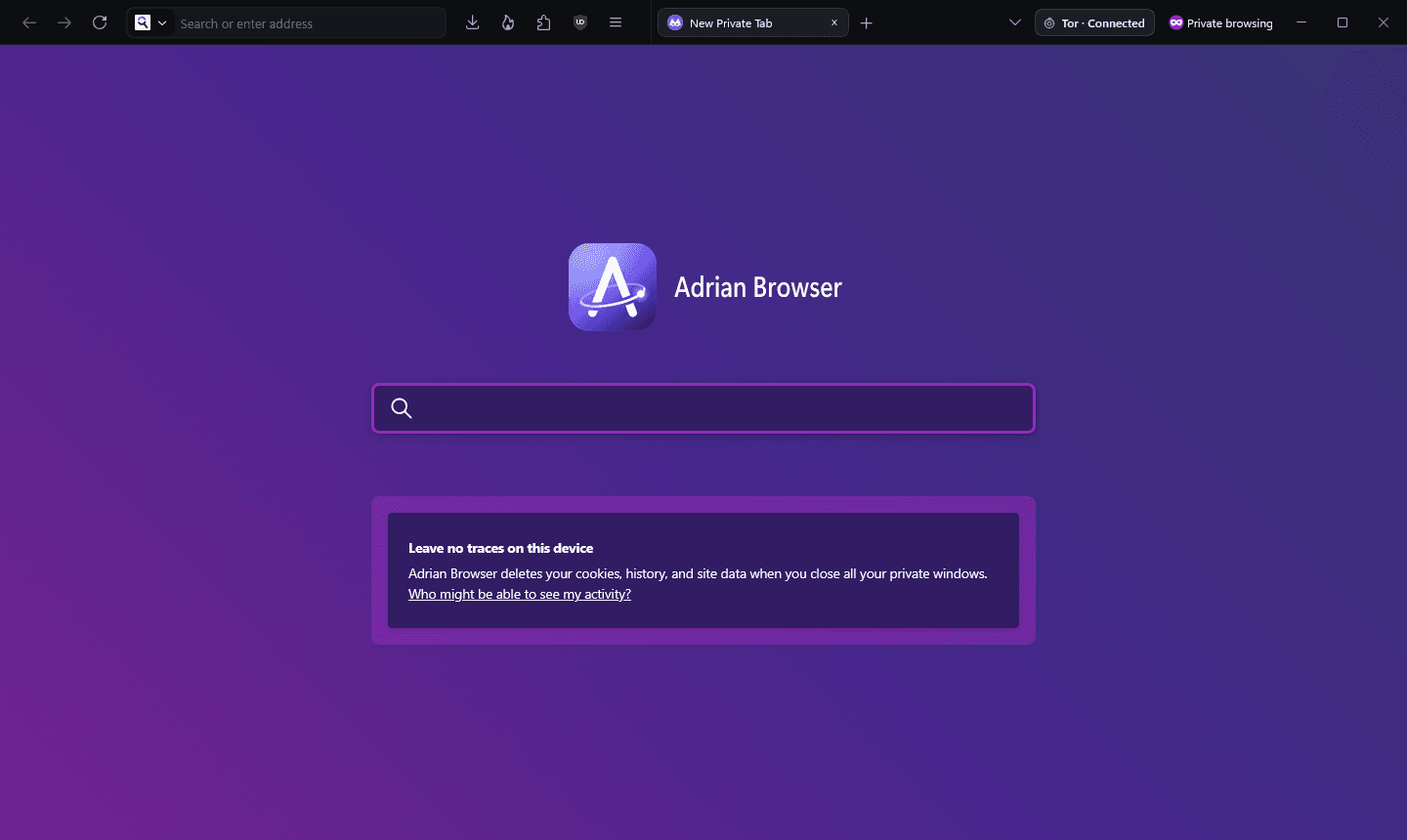
A private window in Adrian Browser with the green Tor status pill next to the window controls
A private window, connected. The green pill next to the window controls is the Tor status.

How a private request travels

  1. Private window

    its traffic is kept apart

  2. Built-in Tor

    a separate path for every site

  3. Three relays

    no single relay knows both ends

  4. Website

    sees the last relay, not you

Normal windows are untouched and keep your full connection speed. Only private windows travel through Tor, including the lookups that turn a site name into an address.

What a website can see

SignalNormal windowPrivate window
IP addressYour ownA Tor exit relay, different per site
DNS lookupsEncrypted, through Quad9Resolved inside Tor, never locally
User-AgentPlain Firefox 156Identical to Tor Browser
Time zoneYour ownUTC
LanguageYour ownen-US
Screen sizeYour ownThe window, rounded to fixed steps
CPU coresYour ownA fixed, common value
Canvas and audioProtected against known scriptsRandomised per session
WebRTCLocal addresses hiddenDisabled
Third-party cookiesIsolated per siteBlocked
When the window closesHistory and cookies keptEverything is wiped

Fail closed

If Tor is unavailable, private pages simply do not load. They never fall back to your real connection.

One circuit per site

Each site gets its own path through the network, so two sites cannot compare notes by looking at the exit address.

New identity

One click closes the private tabs, clears their cookies, cache and storage, then moves every site to a fresh circuit and exit.

No trace on disk

Private pages are cached in memory only, including media, and the session is discarded when the last private window closes.

Always visible

The Tor status pill

Every private window shows the state of its connection next to the window controls. Its menu holds New identity and Reconnect. When the row is short, the pill shrinks to its icon and keeps its colour.

Tor · Connecting 45%Tor · ConnectedTor · Offline

Verified, not promised

The automated leak test

Every release is driven through a scripted run that browses in a private window and checks what leaves the computer. The release on this page passed all of it.

  • PASSnormal window is not routed through Tor
  • PASSTor is not running before any private window
  • PASSTor started by the private window
  • PASSprivate window exits through Tor
  • PASStime zone spoofed to UTC
  • PASSlanguage en-US
  • PASSUser-Agent matches Tor Browser
  • PASSWebRTC unavailable
  • PASSWebTransport unavailable
  • PASSwindow size bucketed, screen hidden
  • PASSCPU core count spoofed
  • PASSnew identity: private tabs closed
  • PASSnew identity: exit address changed
  • PASSno private lookup left outside Tor

An honest limit. No browser can promise perfect anonymity. Signing in to an account, or opening a downloaded file outside the browser, identifies you no matter which network carried the request.

05 · Changes

What came out, what went in.

Normal windows are hardened too: HTTPS-Only, cookies isolated per site, fingerprinting protection, tracking parameters stripped from links and Global Privacy Control.

Removed

  • Telemetry, studies and remote experiments
  • Pocket, sponsored shortcuts and sponsored suggestions
  • AI chatbot sidebar, link previews and smart tab groups
  • Firefox View, VPN promos and “More from Mozilla”
  • Background update checks and the default-browser agent
  • Crash reporter uploads
  • DRM playback (Encrypted Media Extensions)
  • Onboarding tours, surveys and feedback prompts

Added

  • Obsidian interface with a single 44px row
  • Bundled Tor client carrying every private window
  • Memory saver for idle and background time
  • Tab sleep for tabs unused for 45 minutes
  • uBlock Origin preinstalled, allowed in private windows
  • DNS over HTTPS through Quad9 with malware blocking
  • Tor status pill with New identity and Reconnect
  • Branded Windows installer and default-apps registration

06 · Download

Install Adrian Browser

A single installer for 64-bit Windows 10 and 11. It adds Start menu and Desktop shortcuts and can be removed from Windows Settings like any other app.

Download for Windows

v0.1.0 · 88.7 MB · Windows 10/11 x64 · Sep 21, 2026

Verify the file · SHA-256

2b40f5e353732f2cc0539547d2e85c3d29f7ef08ed6cc8191a227e43d034f178

Get-FileHash .\AdrianBrowserSetup-0.1.0.exe -Algorithm SHA256

Before you run it

The installer is not code-signed yet, so Windows SmartScreen may warn before it starts: choose “More info”, then “Run anyway”, after checking the hash. Updates are manual for now, and new versions are published on this page.